---
title: What makes a great Revit family? The Fetch content strategy, explained
description: Learn what makes a great Revit family and explore Fetch's detailed approach to creating high-quality, efficient Revit content.
image: https://blog.fetchbim.com/hubfs/content_strategy.jpg
---

[![Fetch BIM](https://blog.fetchbim.com/hs-fs/hubfs/raw_assets/public/FetchBIM_November_2022/images/Fetch-Logo-Dark.png?height=262&name=Fetch-Logo-Dark.png "Fetch BIM")](https://fetchbim.com/)

BIM Library

[By Markets](https://fetchbim.com/bim-library/markets)

[By Product Type](https://fetchbim.com/bim-library/product-types)

[Business Highly flexible workplace and storage solutions are more important than ever.](https://fetchbim.com/bim-library/markets/business) [Education With hybrid learning here to stay, we specialize in modular classroom furniture, lockers, and furnishing.](https://fetchbim.com/bim-library/markets/education) [Healthcare Nurses, doctors, and technicians need easily located storage solutions with fast access to provide patient care.](https://fetchbim.com/bim-library/markets/healthcare)

[Industrial High-quality industrial storage solutions that are efficient and can grow with your business.](https://fetchbim.com/bim-library/markets/industrial) [Museum Protect irreplaceable artifacts and preserve important specimens in any museum or gallery collection.](https://fetchbim.com/bim-library/markets/museum) [Public Safety Secure evidence, turnout gear, and find the right tool quickly when time is of the essence.](https://fetchbim.com/bim-library/markets/public-safety)

[Casework Create breakrooms, lounge areas, and office settings that are functional and stylish.](https://fetchbim.com/bim-library/product-types/casework) [Lockers Lockers provide safe, secure, and accessible storage in almost any setting.](https://fetchbim.com/bim-library/product-types/lockers) [Retrieval Systems Bring inventory to where it’s needed, minimizing time spent searching for a part.](https://fetchbim.com/bim-library/product-types/retrieval-systems)

[Shelving Whether it’s a small room or a large warehouse, shelving solutions can make any storage space functional.](https://fetchbim.com/bim-library/product-types/shelving) [Desk, tables & stations The first step to completing any manual task is to use the proper work surface.](https://fetchbim.com/bim-library/product-types/desk-tables-workstations)

[View All Families](https://fetchbim.com/search?m=0)

[View All Model Groups](https://fetchbim.com/search?f=0)

Resources

Learn

Support

Featured Content

[About Us Learn about who we are and what we do.](https://fetchbim.com/about) [Blog Discover the latest Fetch product updates and news.](https://blog.fetchbim.com/)

[FAQ Get quick answers to our most common questions.](https://fetchbim.com/faq) [Contact Us Contact us to get assistance from our sales or support teams.](https://fetchbim.com/contact) [Documentation Documentation and guides to get the most out of Fetch.](https://fetchbim.com/documentation)

[![](https://23230026.fs1.hubsblog.fetchbim.compotusercontent-na1.net/hubfs/23230026/Fetch/how-to-fetch.png') How to Use Fetch: Effortless Revit Model Insertion & Customization](https://blog.fetchbim.com/how-to-use-fetch-effortless-revit-model-insertion-customization)

[![](https://blog.fetchbim.com/hubfs/revit-myth-blog.webp) Reductive Thinking in BIM: Revit and the Myth of the Over-Modeled Family](https://blog.fetchbim.com/reductive-thinking-in-bim-autodesk-revit-and-the-myth-of-the-over-modeled-family)

[![](https://blog.fetchbim.com/hubfs/Fetch%201.4.1%20-%20filters.jpg) New Features and Updates to Fetch](https://blog.fetchbim.com/fetch-app-update-2024)

- [BIM Library](https://fetchbim.com/bim-library) 
    - [All Model Groups](https://fetchbim.com/bim-library/model-groups) 
          - [Garment Rack](https://fetchbim.com/bim-library/model-groups/garment-rack)
          - [Smart Day Use Lockers](https://fetchbim.com/bim-library/model-groups/smart-day-use-lockers)
          - [4 Post Shelving](https://fetchbim.com/bim-library/model-groups/4-post-shelving)
          - [Rotary Files](https://fetchbim.com/bim-library/model-groups/rotary-files)
    - [All Families](https://fetchbim.com/bim-library/families)
    - [Markets](https://fetchbim.com/bim-library/markets) 
          - [Business](https://fetchbim.com/bim-library/markets/business) 
                  - [Mail Room](https://fetchbim.com/bim-library/markets/business/mail-room)
                  - [Administration](https://fetchbim.com/bim-library/markets/business/administration)
                  - [Storage](https://fetchbim.com/bim-library/markets/business/storage)
                  - [Break Room](https://fetchbim.com/bim-library/markets/business/break-room)
                  - [Laminate Casework](https://fetchbim.com/bim-library/markets/business/laminate-casework)
          - [Education](https://fetchbim.com/bim-library/markets/education) 
                  - [Library](https://fetchbim.com/bim-library/markets/education/library)
                  - [Music](https://fetchbim.com/bim-library/markets/education/music)
                  - [Lockers](https://fetchbim.com/bim-library/markets/education/lockers)
                  - [Break Room](https://fetchbim.com/bim-library/markets/education/break-room)
                  - [Lab Casework](https://fetchbim.com/bim-library/markets/education/lab-casework)
                  - [Laminate Casework](https://fetchbim.com/bim-library/markets/education/laminate-casework)
                  - [Class Room](https://fetchbim.com/bim-library/markets/education/class-room)
                  - [Flex Space](https://fetchbim.com/bim-library/markets/education/flex-space)
                  - [STEM Makers Space](https://fetchbim.com/bim-library/markets/education/stem-makers-space)
          - [Healthcare](https://fetchbim.com/bim-library/markets/healthcare) 
                  - [Surgical](https://fetchbim.com/bim-library/markets/healthcare/surgical)
                  - [Pharmacy Casework](https://fetchbim.com/bim-library/markets/healthcare/pharmacy-casework)
                  - [Administration](https://fetchbim.com/bim-library/markets/healthcare/administration)
                  - [Exam Room](https://fetchbim.com/bim-library/markets/healthcare/exam-room)
                  - [Storage](https://fetchbim.com/bim-library/markets/healthcare/storage)
                  - [Lab Casework](https://fetchbim.com/bim-library/markets/healthcare/lab-casework)
                  - [Wire Shelving](https://fetchbim.com/bim-library/markets/healthcare/wire-shelving)
          - [Industrial](https://fetchbim.com/bim-library/markets/industrial) 
                  - [Carousels and Lifts](https://fetchbim.com/bim-library/markets/industrial/carousels-and-lifts)
                  - [High Density Storage](https://fetchbim.com/bim-library/markets/industrial/high-density-storage)
          - [Museum](https://fetchbim.com/bim-library/markets/museum) 
                  - [Flat File](https://fetchbim.com/bim-library/markets/museum/flat-file)
                  - [Preservation](https://fetchbim.com/bim-library/markets/museum/preservation)
                  - [Security](https://fetchbim.com/bim-library/markets/museum/security)
          - [Public Safety](https://fetchbim.com/bim-library/markets/public-safety) 
                  - [Bike Storage](https://fetchbim.com/bim-library/markets/public-safety/bike-storage)
                  - [Casework](https://fetchbim.com/bim-library/markets/public-safety/casework) 
                            - [Laminate](https://fetchbim.com/bim-library/markets/public-safety/casework/laminate)
                            - [Stainless Steel](https://fetchbim.com/bim-library/markets/public-safety/casework/stainless-steel)
                            - [Powder Coated Steel](https://fetchbim.com/bim-library/markets/public-safety/casework/powder-coated-steel)
                  - [Detention](https://fetchbim.com/bim-library/markets/public-safety/detention)
                  - [Firehouse Furniture](https://fetchbim.com/bim-library/markets/public-safety/firehouse-furniture)
                  - [Lockers](https://fetchbim.com/bim-library/markets/public-safety/lockers) 
                            - [Evidence Lockers](https://fetchbim.com/bim-library/markets/public-safety/lockers/evidence-lockers)
                            - [Gear Lockers](https://fetchbim.com/bim-library/markets/public-safety/lockers/gear-lockers)
                            - [Smart Lockers](https://fetchbim.com/bim-library/markets/public-safety/lockers/smart-lockers)
                  - [Fixed Shelving](https://fetchbim.com/bim-library/markets/public-safety/fixed-shelving)
                  - [Mobile Shelving](https://fetchbim.com/bim-library/markets/public-safety/mobile-shelving)
                  - [Weapon Storage](https://fetchbim.com/bim-library/markets/public-safety/weapon-storage)
                  - [Wire Cages](https://fetchbim.com/bim-library/markets/public-safety/wire-cages)
                  - [Workstations](https://fetchbim.com/bim-library/markets/public-safety/workstations)
    - [Product Types](https://fetchbim.com/bim-library/product-types) 
          - [Casework](https://fetchbim.com/bim-library/product-types/casework) 
                  - [Laminate Casework](https://fetchbim.com/bim-library/product-types/casework/laminate-casework) 
                            - [Modular Casework](https://fetchbim.com/bim-library/product-types/casework/laminate-casework/modular-laminate-casework)
                            - [Mail Laminate Casework](https://fetchbim.com/bim-library/product-types/casework/laminate-casework/mail-laminate-casework)
                  - [Stainless Steel Casework](https://fetchbim.com/bim-library/product-types/casework/stainless-steel-casework)
                  - [Steel Lab Casework](https://fetchbim.com/bim-library/product-types/casework/steel-lab-casework)
          - [Desks](https://fetchbim.com/bim-library/product-types/desks)
          - [Lockers](https://fetchbim.com/bim-library/product-types/lockers) 
                  - [Laminate Lockers](https://fetchbim.com/bim-library/product-types/lockers/laminate-lockers) 
                            - [Athletic Lockers](https://fetchbim.com/bim-library/product-types/lockers/laminate-lockers/athletic-lockers)
                            - [Day Lockers](https://fetchbim.com/bim-library/product-types/lockers/laminate-lockers/day-lockers)
                            - [Firehouse Lockers](https://fetchbim.com/bim-library/product-types/lockers/laminate-lockers/firehouse-lockers)
                            - [Instrument Lockers](https://fetchbim.com/bim-library/product-types/lockers/laminate-lockers/instrument-lockers)
                            - [Smart Parcel Lockers](https://fetchbim.com/bim-library/product-types/lockers/laminate-lockers/smart-parcel-lockers)
                  - [Metal Lockers](https://fetchbim.com/bim-library/product-types/lockers/metal-lockers) 
                            - [Bike Lockers](https://fetchbim.com/bim-library/product-types/lockers/metal-lockers/bike-lockers)
                            - [Evidence Lockers](https://fetchbim.com/bim-library/product-types/lockers/metal-lockers/evidence-lockers)
                            - [Gear Lockers](https://fetchbim.com/bim-library/product-types/lockers/metal-lockers/gear-lockers)
                            - [Gun Lockers](https://fetchbim.com/bim-library/product-types/lockers/metal-lockers/gun-lockers)
                  - [Wire Lockers](https://fetchbim.com/bim-library/product-types/lockers/wire-lockers)
                  - [Locker Benches](https://fetchbim.com/bim-library/product-types/lockers/locker-benches)
                  - [Locks](https://fetchbim.com/bim-library/product-types/lockers/locks)
          - [Retrieval Systems](https://fetchbim.com/bim-library/product-types/retrieval-systems)
          - [Shelving](https://fetchbim.com/bim-library/product-types/shelving) 
                  - [4 Post Shelving](https://fetchbim.com/bim-library/product-types/shelving/4-post-shelving)
                  - [Cantilever Shelving](https://fetchbim.com/bim-library/product-types/shelving/cantilever-shelving)
                  - [High Density Shelving](https://fetchbim.com/bim-library/product-types/shelving/high-density-shelving)
                  - [Industrial Shelving](https://fetchbim.com/bim-library/product-types/shelving/industrial-shelving)
                  - [Museum Shelving](https://fetchbim.com/bim-library/product-types/shelving/museum-shelving)
                  - [Rotary Shelving](https://fetchbim.com/bim-library/product-types/shelving/rotary-shelving)
                  - [Wire Shelving](https://fetchbim.com/bim-library/product-types/shelving/wire-shelving)
                  - [Pharmacy Shelving](https://fetchbim.com/bim-library/product-types/shelving/pharmacy-shelving)
          - [Workstations](https://fetchbim.com/bim-library/product-types/workstations)
- [Resources](https://fetchbim.com/) 
    - [Learn](https://fetchbim.com/) 
          - [About](https://fetchbim.com/about)
          - [Blog](https://blog.fetchbim.com)
    - Support 
          - [Contact](https://fetchbim.com/contact)
          - [FAQ](https://fetchbim.com/faq)

[Sign in](https://fetchbim.com/login)

[Download Fetch](https://fetchbim.com/login)

Menu

[Revit](https://blog.fetchbim.com/tag/revit) [Fetch](https://blog.fetchbim.com/tag/fetch)

# What makes a great Revit family? The Fetch content strategy, explained

 March 6, 2026  - [Kyle Bruxvoort](https://blog.fetchbim.com/author/kyle-bruxvoort)

![](https://blog.fetchbim.com/hubfs/content_strategy.jpg)

<https://twitter.com/intent/tweet>

<https://facebook.com/sharer/sharer.php>

<https://www.linkedin.com/sharing/share-offsite/>

<http://pinterest.com/pin/create/button/>

Most Revit users have been burned by bad families. The geometry looks fine in the vendor's screenshot, but drop it into your project and the problems start: the file balloons in size, the parameters are a cryptic mess, the plan view is cluttered with detail you don't need, and when you go to spec it, the product code doesn't exist. You delete it and start over.

Bad families aren't just annoying. They cost real time, time spent cleaning up, debugging, re-modeling, and explaining to a client why the drawing looks the way it does.

At Fetch, we've spent a significant amount of time thinking about what separates a family that's genuinely useful from one that just technically works. This post breaks down our content strategy from first principles, not as a product pitch, but because we think the reasoning behind these decisions is worth sharing. If you make families, or you're evaluating content for your firm, this is the thinking we'd want you to apply.

---

## Start with Who's Making It

The most important thing about Fetch content isn't a specific feature. It's who built it. Our families are made by design professionals who have used Revit on real projects: furniture layouts, lighting plans, equipment schedules, construction documents. We know what it's like to be three days before a DD deadline and discover that a manufacturer's family has a 4MB file size and wrecks your project performance.

That experience shapes every decision we make. When we talk about "5D BIM as a baseline," we mean that cost data and product data aren't afterthoughts. They're part of the core information model from day one. Families include list pricing for budgeting and value engineering. They include real product codes so specifications actually connect to what's on the drawings. Built-in constraints mean you can't model configurations that don't exist in real life, which sounds obvious, but most content doesn't do this.

The goal is a single source of truth: one place where your Revit content, your product data, and your specification information are all aligned and maintained.

---

## Usability Is a Design Problem

A family that's technically correct but hard to use is a bad family. Usability in Revit content isn't soft, it's measurable. How long does it take someone to place the family correctly? How many clicks to find the right type? How often do users set a parameter wrong because the interface didn't make the right answer obvious?

We treat usability as a design problem with real solutions.

**Naming** follows a consistent logic: families are named from generic to specific, so similar content groups together naturally in the Revit project browser. Types are reserved for meaningful configuration changes, not minor variations that could be handled with parameters. When a family only has one type, we call it "Default." No ambiguity, no hunting.

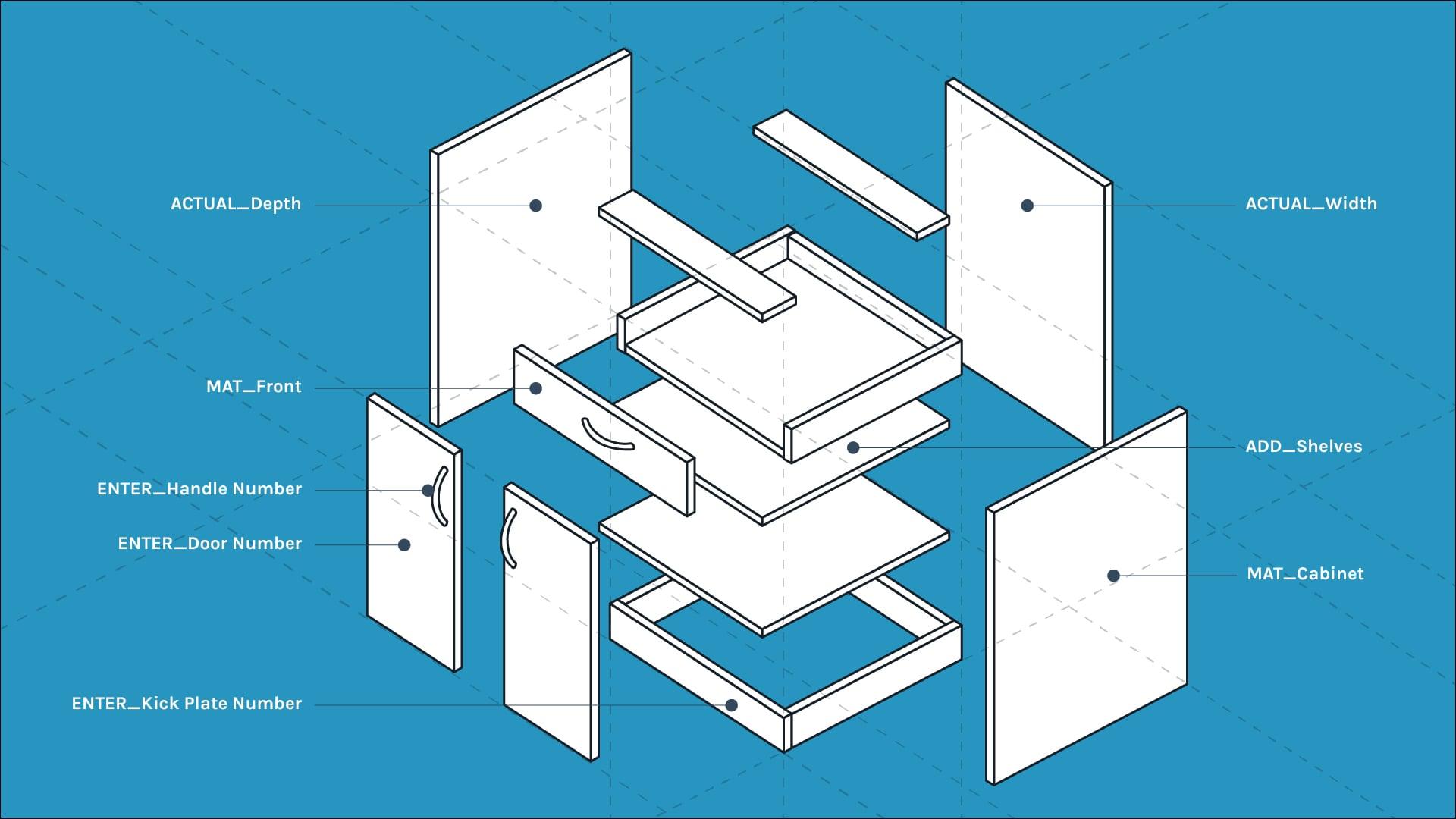
**Parameters** are where most family libraries fall apart. Ours follow a strict structure: standard parameter sets across each category, prefixes that signal what a parameter does, parameter groups that stay consistent across all families so users develop muscle memory, and tooltips that explain non-obvious inputs. We use input validation instead of massive type catalogs wherever we can, because it's faster and produces fewer errors. Hidden parameters keep the interface clean. If a parameter isn't something a user should modify directly, it doesn't show up in the properties palette.

**Shared parameters** are used deliberately across similar product categories. This matters when you're doing large-scale modifications or building schedules. Having consistent parameter names across a whole category means you can write one schedule and have it work across dozens of families.

 If you want a working reference for all of this, we turned the [full strategy into a checklist](https://blog.fetchbim.com/hubfs/Blog-Assets/Fetch/Fetch-Revit-Family-Checklist.pdf) you can use on your own families.

[![Download the Family Quality Checklist →](https://no-cache.hubspot.com/cta/default/23230026/interactive-208841659021.png)](https://blog.fetchbim.com/hs/cta/wi/redirect?encryptedPayload=AVxigLJ1YcpMH8nAVtQxpKdG7g%2BCRsZYxLRT5iz8K3X2%2BDU%2BXb9IaHkv3viMaJFKnV%2BOgr9fViMaEUuY%2FCL9uckgWJff4W0DmidiQuGVrvmqXF4mNVZ2pV6ATVogX3q%2FW9huLldui%2Fm11fgrGWGWgZ2IYarhj7u1yR84UWWLHiGfVoihjrjnbd1DmezgexqY%2FhQw%2FPTJQsrhpBYqrG9r2wsm7DfkLGcx66DGjdmNdQ6t8aOMHMlQhYfdzyIC&webInteractiveContentId=208841659021&portalId=23230026)

---

## Performance Is Respect for Your Team

A bloated family isn't just a technical problem. It's a statement about how much you value the people using your content. When a model slows down because of bad geometry decisions in a family, everyone on the project pays for it.

Our performance targets are specific:

- **Optimal families**: under 1MB, one or two nested families
- **Complex families**: 1–1.5MB, three to five nested families

Getting there requires intentional tradeoffs. We build levels of detail into every family, with simplified geometry in coarser views and detail where it counts. We're conservative about arrays. We only use them when there are more than three repeated objects and the range is wide enough that basic visibility toggling would produce worse results. Voids are avoided unless they're genuinely necessary, because they add computational overhead. All geometry is constrained to reference planes, which makes families more stable and predictable when parameters change.

Plan geometry is simplified deliberately, not because we're cutting corners, but because a cluttered plan view slows down production work. We include a small hidden line to indicate the back of the family, which matters for alignment. All 2D elements follow standard drafting conventions.

Materials matter too. Every Fetch family includes PBR materials using built-in images, which means no broken material paths when you open the family in a different environment. We also provide a complete material library with all standard materials and images for when you need to customize.

---

## Quality You Can Actually Verify

Here's the part most content providers don't talk about: how do you know the families are actually correct?

Every Fetch family goes through a structured QA/QC process before it ships, and the same tests run whenever families are updated. These aren't manual spot-checks. They're systematic.

**Naming tests** use regular expressions to verify that family names, type names, parameter names, and nested family names all conform to our naming standards. If a family comes back with a parameter named inconsistently, it doesn't pass.

**Performance tests** check file size, verify that plan geometry is hidden where it should be, and confirm that levels of detail are properly configured.

**Parameter tests** validate that parameters are in the correct groups, that values are appropriate for their type, and that nothing's been left in a broken state.

**Import tests** check for imported CAD, imported images, imported line patterns, and imported materials. All things that can sneak into a family and cause problems in other environments.

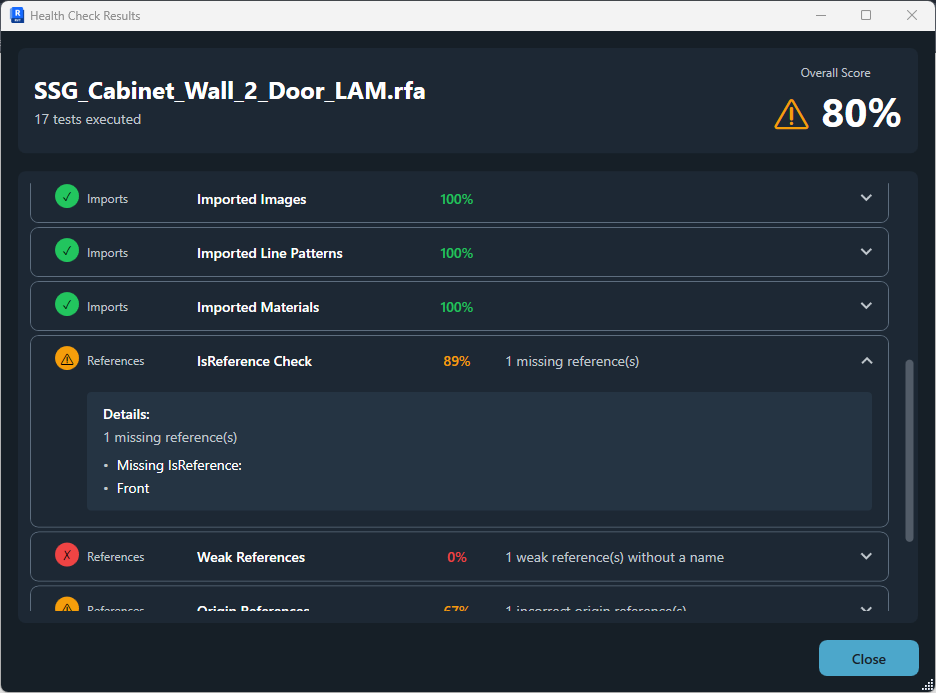
**Reference tests** verify IsReference settings, flag weak references, and confirm origin references are set correctly. This is the stuff that makes families behave well when users are dimensioning and aligning.

**Standardization tests** confirm family category is correct, which matters for scheduling, tagging, and electrical properties.

The reason this matters: families break. Products change, Revit updates introduce bugs, and even careful work produces errors. What matters is having a process that catches problems systematically and a team in place to fix them quickly. We do.
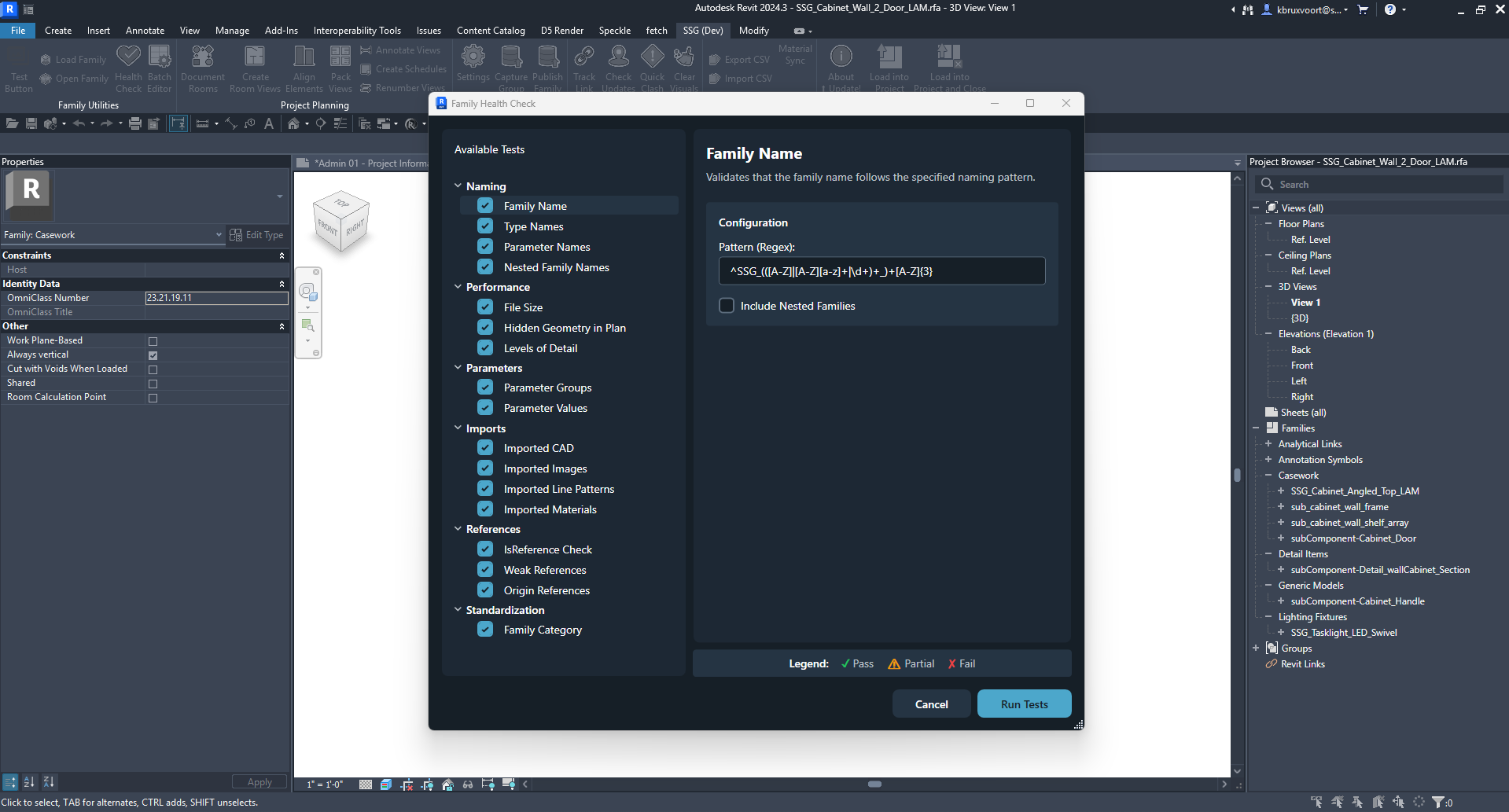
![fetch-family-health-check](https://blog.fetchbim.com/hs-fs/hubfs/Fetch/fetch-family-health-check.png?width=1919&height=1033&name=fetch-family-health-check.png)*The internal test suite we use to verify all of our families*

![fetch-family-health-check-scores](https://blog.fetchbim.com/hs-fs/hubfs/Fetch/fetch-family-health-check-scores.png?width=936&height=693&name=fetch-family-health-check-scores.png)

Each section returns a score and actionable data on what needs to be fixed

---


## It's Not Just Families

One thing we've learned is that content strategy can't stop at the family file. A well-built family in a project that doesn't have the right tags or schedules to use it is only half the solution.

Fetch provides a complete content ecosystem:

- **Families:** the core parametric content
- **Model groups:** pre-assembled configurations for common use cases
- **Tags:** matched to family parameters so they work correctly out of the box
- **Schedules:** pre-built to surface the information that matters
- **Templates:** project templates that incorporate all of the above
- **Material libraries:** so materials are consistent across families and projects

When you bring Fetch content into your workflow, you're not just getting geometry. You're getting a system that works.

---

## The Standard We Hold Ourselves To

We've written all of this out not to tell you our content is perfect, but to be transparent about the standard we're trying to meet and the reasoning behind it. Every decision described in this post represents a real tradeoff: between flexibility and simplicity, between file size and detail, between automation and human judgment.

If you make your own families, we put together an [8-section, 55-point checklist](https://blog.fetchbim.com/hubfs/Blog-Assets/Fetch/Fetch-Revit-Family-Checklist.pdf) covering everything from naming conventions and parameter structure to performance targets and QA testing. It's the same standard we hold Fetch content to, and you're welcome to use it on your own work.

[![Download the Family Quality Checklist →](https://no-cache.hubspot.com/cta/default/23230026/interactive-208841659021.png)](https://blog.fetchbim.com/hs/cta/wi/redirect?encryptedPayload=AVxigLJ1YcpMH8nAVtQxpKdG7g%2BCRsZYxLRT5iz8K3X2%2BDU%2BXb9IaHkv3viMaJFKnV%2BOgr9fViMaEUuY%2FCL9uckgWJff4W0DmidiQuGVrvmqXF4mNVZ2pV6ATVogX3q%2FW9huLldui%2Fm11fgrGWGWgZ2IYarhj7u1yR84UWWLHiGfVoihjrjnbd1DmezgexqY%2FhQw%2FPTJQsrhpBYqrG9r2wsm7DfkLGcx66DGjdmNdQ6t8aOMHMlQhYfdzyIC&webInteractiveContentId=208841659021&portalId=23230026)

If you're looking for Revit content that's been built to this standard, that's what Fetch is for. [Explore the library.](https://fetchbim.com/search?mg=0)

---

*Have questions about our content strategy or want to talk about how Fetch fits into your firm's workflow? [Get in touch](https://fetchbim.com/contact)*

Tags: [Revit](https://blog.fetchbim.com/tag/revit) [Fetch](https://blog.fetchbim.com/tag/fetch)

[Back to Blog](https://blog.fetchbim.com)

- [Tweet](https://twitter.com/share)

## Related Articles

<https://blog.fetchbim.com/fetch-new-features-and-updates-2023>

## [Fetch: New Features and Updates 2023](https://blog.fetchbim.com/fetch-new-features-and-updates-2023)

 We are thrilled to announce the most recent updates and features to the Fetch application. Our goal...

[Read More](https://blog.fetchbim.com/fetch-new-features-and-updates-2023)

<https://blog.fetchbim.com/stem-workspaces-and-storage>

## [Maximize Space and Promote Creativity in Your Classroom with Fetch's STEM Counter and Storage Products](https://blog.fetchbim.com/stem-workspaces-and-storage)

 Are you looking for the perfect addition to your educational projects? Look no further than Fetch’s...

[Read More](https://blog.fetchbim.com/stem-workspaces-and-storage)

<https://blog.fetchbim.com/creating-efficient-plan-views-for-families-in-revit-with-masking-regions>

## [Creating Efficient Plan Views for Families in Revit with Masking Regions](https://blog.fetchbim.com/creating-efficient-plan-views-for-families-in-revit-with-masking-regions)

 If you're looking for a way to simplify your plan views when creating families, you've come to the...

[Read More](https://blog.fetchbim.com/creating-efficient-plan-views-for-families-in-revit-with-masking-regions)

### **contact information**

2535-B E. State Highway 121, Ste. 110   
Lewisville, Texas 75056

(800) 803-1083

[*#*](https://www.facebook.com/fetchbim)

[*#*](https://twitter.com/fetchbim)

[*#*](https://www.youtube.com/channel/UCCZNSWd-v9HFIy1LdgpQG5g)

**Nav Links**

- [BIM Library](https://fetchbim.com/bim-library)
- [Sign In](https://fetchbim.com/login)

- [All Model Groups](https://fetchbim.com/search?f=0)
- [All Families](https://fetchbim.com/search?m=0)
- [Markets](https://fetchbim.com/bim-library/markets)
- [Product Types](https://fetchbim.com/bim-library/product-types)

- [Site Map](https://blog.fetchbim.com/sitemap.xml)
- [Blog](https://blog.fetchbim.com)

![Fetch BIM](https://blog.fetchbim.com/hubfs/raw_assets/public/FetchBIM_November_2022/images/Fetch-Logo-Dark.png "Fetch BIM")

 © 2023 FetchBIM All Rights Reserved. | [Privacy](https://fetchbim.com/privacy-policy)

```json
{
  "@context" : "https://schema.org",
  "@type" : "BlogPosting",
  "author" : {
    "@type" : "Person",
    "name" : "Kyle Bruxvoort",
    "url" : "https://blog.fetchbim.com/author/kyle-bruxvoort"
  },
  "dateModified" : "2026-03-06T20:44:28.424Z",
  "datePublished" : "2026-03-06T20:34:20.000Z",
  "headline" : "What makes a great Revit family? The Fetch content strategy, explained",
  "image" : [ "https://blog.fetchbim.com/hubfs/content_strategy.jpg" ],
  "mainEntityOfPage" : {
    "@id" : "https://blog.fetchbim.com/what-makes-a-great-revit-family-the-fetch-content-strategy-explained",
    "@type" : "WebPage"
  },
  "publisher" : {
    "@type" : "Organization",
    "logo" : {
      "@type" : "ImageObject",
      "url" : "https://blog.fetchbim.com/hubfs/Branding/Fetch-Logo-Dark-2.png"
    },
    "name" : "Southwest Solutions Group"
  }
}
```