Revit content has come a long way, but most firms still deal with the same problems: inconsistent standards, missing data, broken schedules, and updates that slip through the cracks. These issues slow down projects and force BIM managers and designers into unnecessary cleanup work.
This guide explains why these problems happen and how stronger data standards lead to better results. More importantly, it shows what a modern, maintainable Revit content workflow looks like.
The growing problem with Revit content
Most firms build a portion of their own content and then fill gaps with downloads from places like Fetch, BIMObject, manufacturer websites, or old office libraries. Over time this creates a mixed ecosystem of families that each follow different naming standards, parameter conventions, and levels of detail.
When these families come together in a single project, several issues appear:
- Similar parameters with different names
- Missing parameters that your office standards rely on
- Data locked inside parameters that only exist in the project
- Schedules that behave differently depending on where the family came from
- Content that is difficult to update or maintain
None of these problems happen because people are doing anything wrong. They happen because the tools allow too many approaches. Without a clear structure behind the data, even high-quality geometry will create friction.
Why schedules break and data becomes unreliable
A common workaround in Revit is to use project parameters to patch gaps. This approach feels fast, but it creates a long-term problem.
Here is what happens:
- A firm has a set of standard parameters that its content uses.
- A project includes families downloaded from other sources.
- Those families do not have the same parameters, so the team creates project parameters to bridge the gap.
- The data now exists only inside that one project.
When the same family is used in a new project, the data disappears because project parameters never travel with content. Someone has to recreate the parameters and reenter the information. Over the course of multiple projects, this becomes a cycle of rework and inconsistent schedules.
This is why schedules break. It is rarely the schedule’s fault. It is a data consistency problem created by having content that does not share a common structure.
What a strong Revit content standard actually looks like
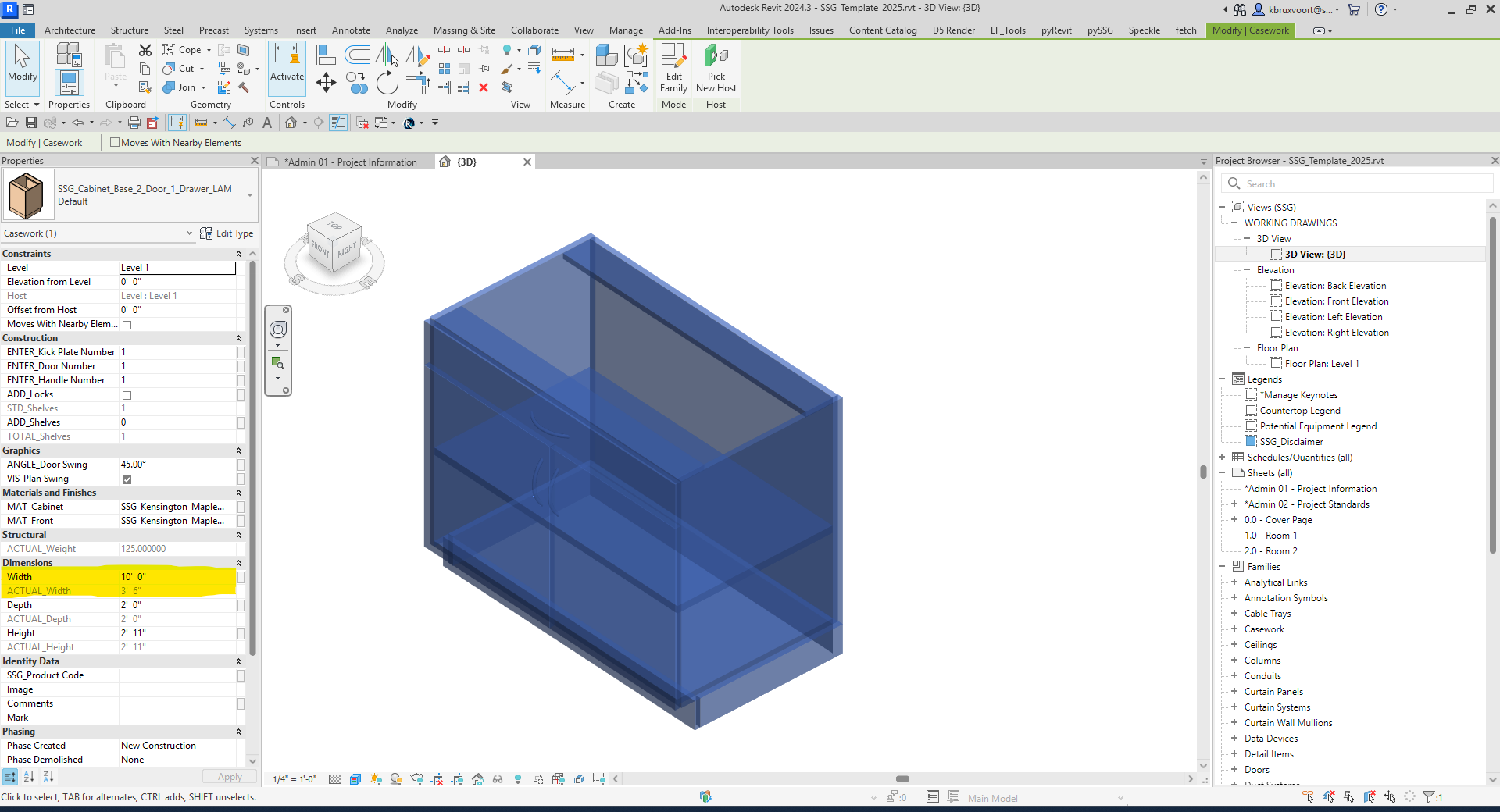
Standards should make the content easy to understand, not harder. At Fetch, the parameter naming follows a clear PREFIX_Name format. The prefix makes the parameter’s role obvious:
- MIN_Width for minimum allowable values
- MAX_Width for maximum allowable values
- ACTUAL_Width for validated sizes that stop users from pushing a family beyond what is possible
This structure is not about forcing everyone into one rigid system. It is about clarity. When a user adjusts a cabinet to a width it cannot reach, ACTUAL_Width stops at the true limit. There is no guessing. There is no hidden logic. It behaves predictably even if the user has never seen the family before.
A clean naming system reduces ambiguity and makes schedules easier to understand at a glance.
How Fetch content matches real-world products
One of the biggest differentiators of Fetch content is that it does more than look like the real product. It behaves like it. This ensures the model is reliable, accurate, and decision-ready.
- Behavioral fidelity: Families enforce the physical limits, allowable configurations, and product rules from the manufacturer. You cannot create a size, configuration, or finish that does not exist in reality.
- Decision support: Every option, variation, and constraint is built in. Designers can explore alternatives safely, knowing the family will only allow feasible results.
- Downstream reliability: Schedules, quantity takeoffs, cost calculations, and documentation remain accurate because the families themselves enforce product realities.
- Lifecycle accuracy: When the manufacturer updates a product — new handles, finishes, or materials — the Revit family can be updated to reflect those changes. Designers are alerted to updates and can decide whether to accept them, keeping the model aligned with reality.
For example, a designer may try to set a cabinet width to 10 feet, but the real product only allows 5 feet. The ACTUAL_Width parameter stops the family at 5 feet, updates the price and SKU selection, and prevents the creation of an impossible specification. This level of fidelity ensures that every project decision is backed by accurate product data.
The role of shared parameters and why most teams underuse them
Shared parameters are one of the most powerful parts of Revit, but they require planning. Many firms avoid using them because:
- Maintaining a shared parameter file is tedious
- Staff do not always understand how they work
- They do not want to constantly modify content from external sources
- Project timelines rarely allow time for cleanup
Because of this, many teams rely on project parameters as a temporary fix, even though that creates long-term maintenance issues.
Fetch families include a standard set of shared parameters from the start. These cover core product data such as:
- Dimensions
- Classifications like MasterFormat, OmniClass, and IFC
- Manufacturer information
- Codes
- Pricing and weight
- Constraints and standard sizes
The result is content that can be tagged or scheduled immediately, without patching or project-level band-aids.
The importance of complete, structured, maintainable data
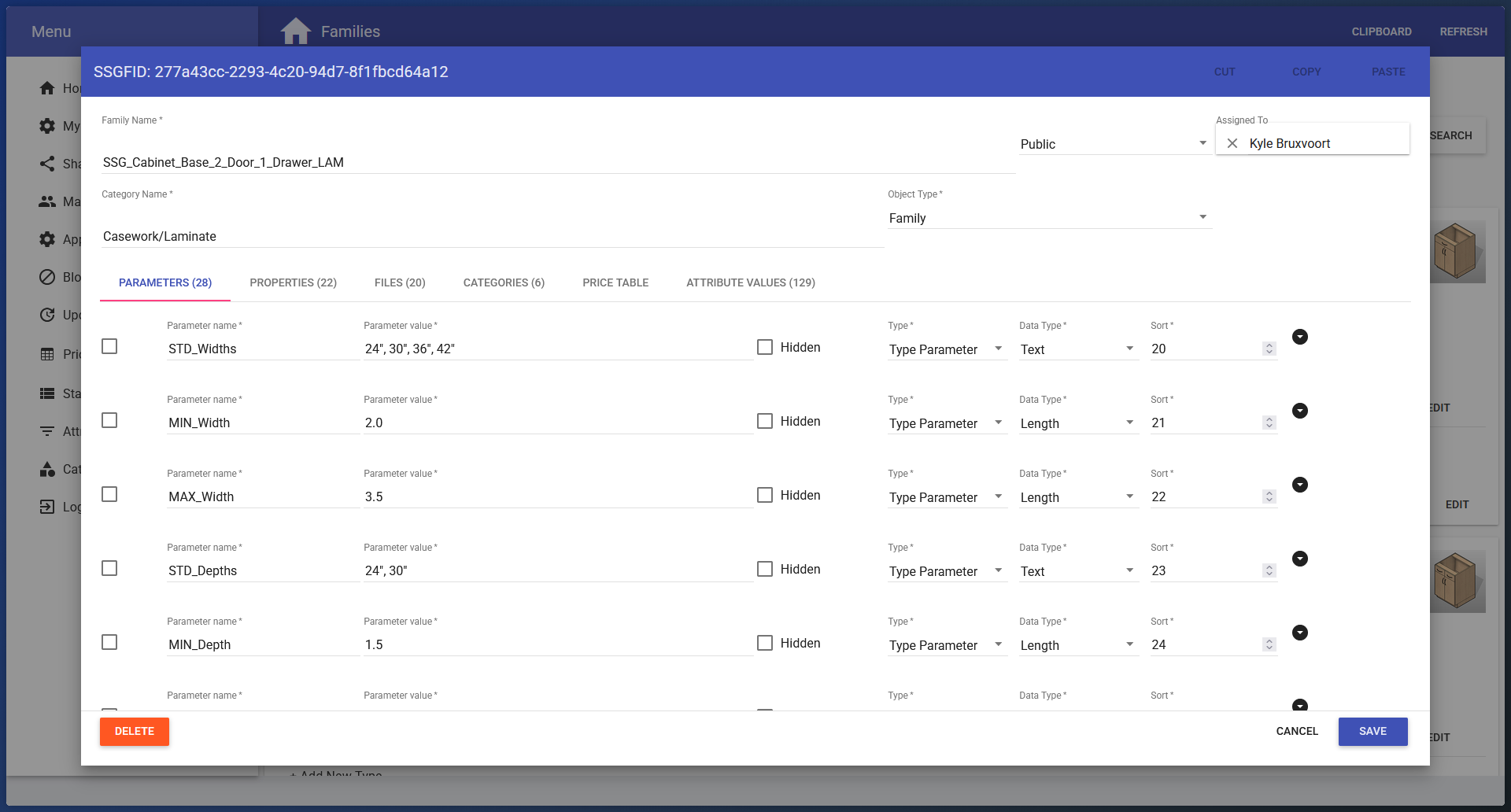
The real strength of a family comes from its data, not just its geometry. The Fetch platform treats data like a product information management system, broken into five areas:
-
Parameters
The values used inside Revit, including behavior-driving parameters, classification data, descriptions, models, and lead times. Every family is at least 5D ready.
-
Properties
Supporting data points better used outside of Revit, such as sustainability information, ADA compliance, web metadata, purchasing contracts, and technical specs.
-
Files
Images, Revit families with full changelogs, cut sheets, brochures, 3 part specifications, finish options, and required material libraries.
-
Categories
Clear content organization for browsing, filtering, and project workflows.
-
Price table
Every possible variant with product code, weight, and price. Mirrors the structure of an eCommerce SKU system.
This structure keeps the content clean, consistent, and reliable across manufacturers, product types, and Revit versions.
Keeping content up to date without losing data
Updates are unavoidable. Manufacturers change hardware, materials get discontinued, and prices shift constantly. The important part is giving users insight into updates without disrupting active projects.
Fetch handles updates in two primary ways:
- Data-only updates, such as price changes. Users see a notification when they open Fetch, can view the exact changes, and decide whether to apply them.
- Geometry or behavior updates, such as new handles. A content creator updates the family, uploads a new version, documents the change, and the end user sees a badge showing that an update is available. They can review the changelog and decide whether or not to update.
This keeps teams in control while maintaining transparency.
Why manufacturers and architects cannot solve this alone
The industry often operates in two extremes:
- Manufacturers create content without understanding Revit workflows
- Architects create content without having complete product data
Neither approach works well by itself. Good content requires both accurate product information and practical design knowledge. Fetch bridges this gap by combining vendor data with Revit experience. The result is content that is accurate, realistic, and ready for real projects.
The goal is not to replace manufacturer content or office standards. It is to create better alignment between the two so that both sides deliver what the other needs.
What this means for BIM managers
A clean, consistent content ecosystem results in:
- Smoother schedules
- Fewer project-specific patches
- Less time spent maintaining content
- Better data across every phase of the project
- Reduced risk during coordination
- A more predictable modeling experience for designers
In short, it gives BIM managers control over the data that drives their models, which leads to better outcomes for the entire team.
Summary
Better Revit content is not about geometry. It is about data integrity, structured parameters, predictable behavior, and a workflow that keeps everything maintainable over time. When content is built with a clear standard and supported by a strong data system, it becomes far easier to trust, update, and schedule.
Content that matches the real-world products ensures every decision in your model is backed by reality. When your families behave correctly, your schedules, costs, and documentation all become reliable.
The firms that invest in better data get better models. And better models lead to better projects.